
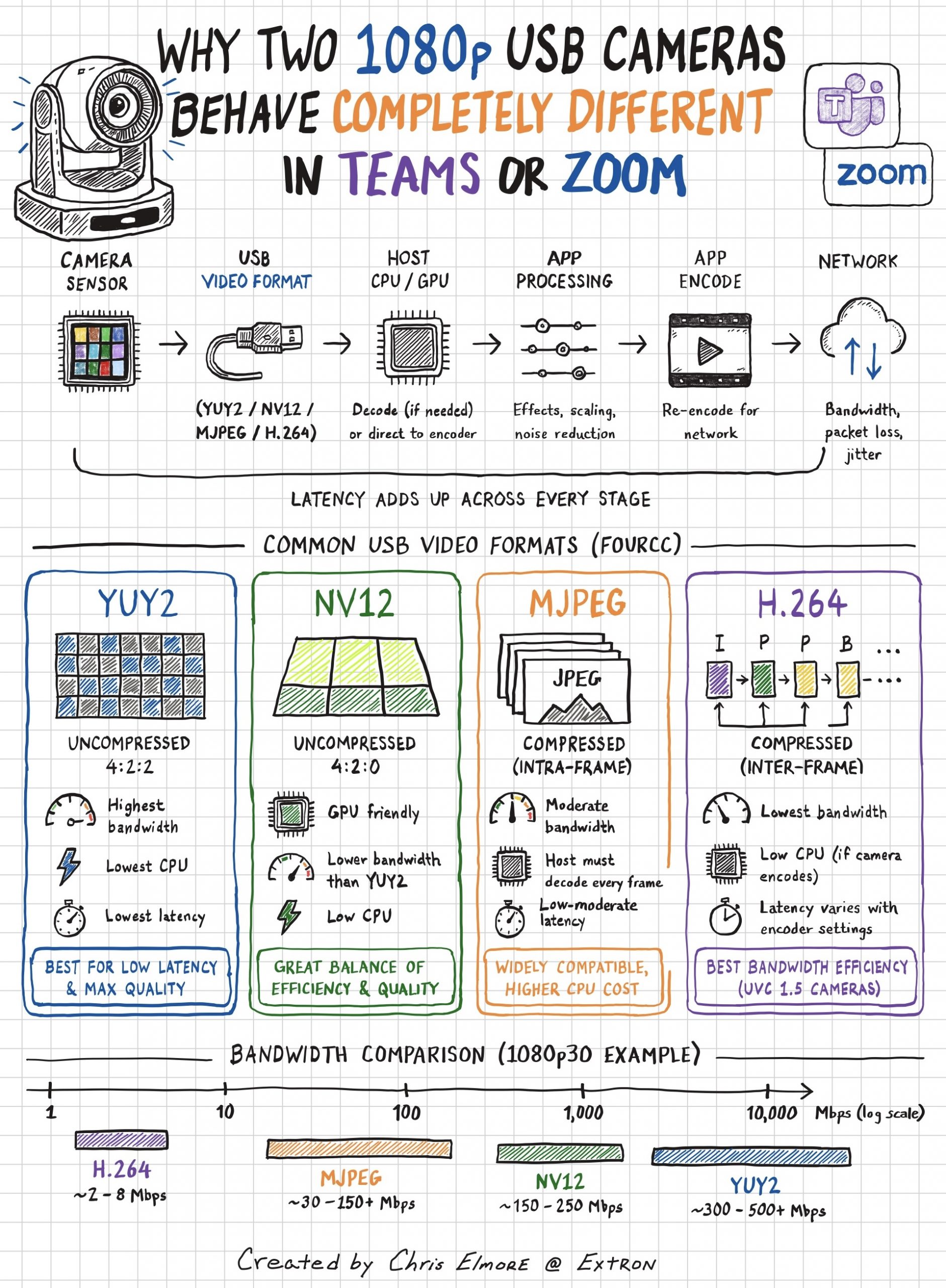
Why can two USB cameras both claim 1080p but behave completely differently in Teams or Zoom?
It usually has less to do with the sensor and more to do with the video format sent over USB and how the conferencing app handles it.
Most webcams support several formats: YUY2, NV12, MJPEG, and H.264. Each shifts the workload differently between the camera, USB bus, and CPU.
To put numbers on it: 1080p30 in YUY2 needs hundreds of Mbps. MJPEG brings that down to tens or over a hundred. H.264 gets you to a few Mbps.
MJPEG compresses each frame as a standalone JPEG, so latency stays reasonable since the decoder doesn’t need previous frames as reference. H.264 is far more bandwidth efficient because it encodes differences between frames, but actual latency depends on encoder tuning. Some implementations use low-latency profiles; others introduce buffering and lookahead that adds real delay in conferencing.
On USB 3.0, uncompressed formats become practical. YUY2 skips the compression stage entirely, so frames move through the ISP to the bus with minimal added latency. NV12 already uses the YUV 4:2:0 format most hardware encoders expect, so the system can often skip color conversion and extra memory copies, and frames move more directly into the encoding pipeline with lower CPU overhead.
But the USB format is only part of the story.
Teams and Zoom almost always re-encode for network transmission using their own profiles. The actual pipeline: camera sensor → USB transport → host decode (if needed) → app processing → app encode → network. Latency stacks across all those stages.
Something that surprises people: the UC app may not even request the camera’s maximum resolution or frame rate. At call start, it negotiates resolution, frame rate, and pixel format over UVC based on available USB bandwidth, CPU and GPU resources, acceleration support, and current conditions. A camera might support 4K while the app intentionally requests 720p to reduce load and keep the call stable.
During a call, the software constantly watches bandwidth, packet loss, and CPU load. If conditions degrade, it scales frames down before encoding, so the camera might be delivering 1080p the whole time while the encoder pushes 720p or lower to the network.
This is why two webcams with the same specs can work completely differently on the same machine. One sends MJPEG, the host has to decode every frame. Another sends YUY2 that feeds more directly into a hardware encoder. Whether any of this is expensive depends on what acceleration is available: Intel Quick Sync, AMD VCN, Apple VideoToolbox. The same camera on a different platformcan have very different behavior.
“4K” or “1080p60” tells you almost nothing about real-world performance. The transport format, software pipeline, and available hardware acceleration determine CPU load, latency, and how the call actually feels.